Open File in Python and viewing contents of that file

37 views Asked by At

I keep getting this error

runfile('C:/Users/Acer Predator/.spyder-py3/temp.py', wdir='C:/Users/Acer Predator/.spyder-py3') <_io.TextIOWrapper name='C:\Users\Acer Predator\est.txt' mode='r' encoding='cp1252'>

I have no idea what I am doing wrong. This is the code that I am using:

file = open ("C:\Users\Acer Predator\est.txt", "r") 
print(file)

Some help please!

Expecting the output to be the contents of the file

2

There are 2 answers

0
CyberTruck On

You won't be able to see the content just by printing the file, you need to call the read method in order to print the content.

file = open(r"C:\temp\tmp\est.txt", "r")
print(file.read())

------------Better way of writing your code------------

with open(r"C:\temp\tmp\est.txt", "r") as file:
    print(file.read())
0
LinconFive On

Follow the error hint, your "est.txt" file has a encoding format "cp1252", so open it as is.

with open('C:\Users\Acer Predator\est.txt', 'r', encoding='cp1252') as file:
    content = file.read()
    print(content) # 

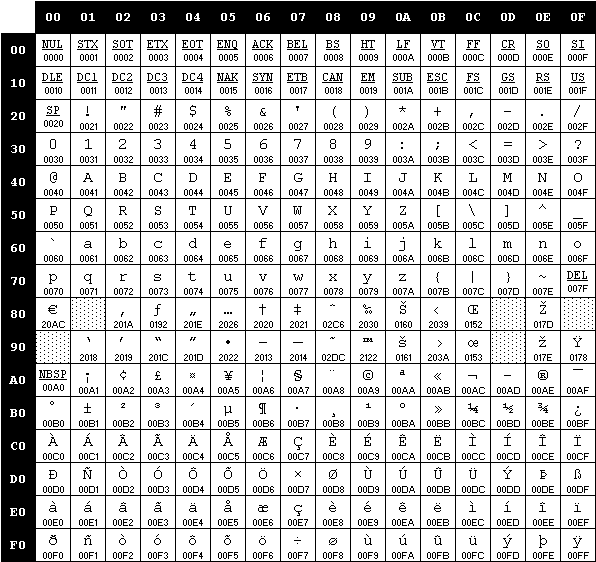
in reality, files are saved in types of different encodings, based on different OS or terminals or languages, and cp1252 is one of them. We all know files are consist of bytes, and bytes are bins, let's see what cp1252 really is in a coding graph as .

cp1252

And this is kind of outdated, see MS current support https://learn.microsoft.com/en-us/powershell/module/microsoft.powershell.management/get-content?view=powershell-7.2

Let's take Montreal as an example for a win11, powershell, python3.14 OV,

octets = b'Montr\xe9al'     #iso8859_1

cp1252 = octets.decode('cp1252')   
print(cp1252)
#should see:Montréal    correct

iso = octets.decode('iso8859_7')
print(iso)
#Montrιal   wrong

koi8_r = octets.decode('koi8_r')
print(koi8_r)
#MontrИal   wrong

utf_8 = octets.decode('utf-8')
print(utf_8)
#error    

new_utf_8 = octets.decode('utf-8', errors='replace')
print(new_utf_8)
#Montr�al    no error, but wrong