I have made a custom Angular theme 'my-theme.scss' and included it in the angular.json file. It works fine with all Angular-Elements, but to some HTML-Elements within Angular Components it does not apply.
Example:
<mat-card class="example-card">
            <mat-card-header>
                <mat-card-title-group>
                    <mat-card-title>Java</mat-card-title>
                    <img mat-card-sm-image src="../../../assets/java.png">
                </mat-card-title-group>
            </mat-card-header>
            <mat-card-content>
                <p>
                Put a list here.
                </p>
            </mat-card-content>
</mat-card>
The custom typography of my 'my-theme.scss' will apply to the title of this card:
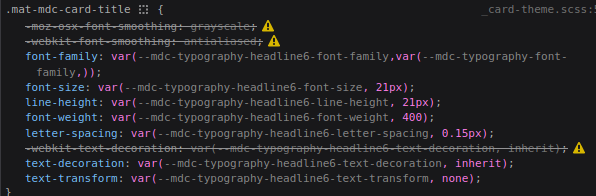
But it won't apply to the anything within the mat-card-content for example.

Why is this and how can I fix it?

In your styles.scss, you will ned to apply your font to your body: (Working example with Angular / Material 15)