Emeditor to extract displayed strings for each line (maintaining the line order)

266 views Asked by At

How can I use emeditor to find and extract regex strings but maintain the same lines +/- a delimiter?

The output I get when I try to extract displayed strings, extracts each matched string to a new line. But my goal is to extract these matches from each line (removing the values I dont want)

For example

Starting with:

dog cat food
prince dog food

I would like to end up with

dog food
prince food

Or

with a delimiter

dog, food
prince, food

But using Emeditor

  1. Cntr+F
  2. (\b\w+\b)$|^\w+ and then selecting Regular expressions and extract>display matched strings only

the ouput is

dog
food
prince
food

Can this be accomplished using EmEditor or through a macro?

3

There are 3 answers

3
Yutaka On BEST ANSWER

Use the Filter toolbar instead of the Find dialog.

  1. In the Filter toolbar, click the Use Regular Expressions button, and enter a regular expression, for instance, ^\w+|\w+$, in the Filter drop-down list box.

enter image description here

  1. Click the Extract All button in the Filter toolbar, then select Extract Options in the popup menu.

enter image description here

  1. In the Filter Extract Options dialog box, select Extract all matched strings, and enter \t or , as a Delimiter. Click OK.

  2. Click the Extract All button again in the Filter toolbar, then select Extract Matched Strings in the popup menu.

If you record this procedure to a macro, you will get a macro like this:

document.Filter("^\\w+|\\w+$",0,eeFindReplaceRegExp,0,0,0,0,0);
editor.ExecuteCommandByID(4084);  // Extract Matched Strings

If you need to run this macro against many files in a folder, please see: Emeditor: run a macro for all file inside a folder?

7
TM1 On

I hope I understand the task correctly, the first and third of three values should remain.

Solution approach according to your example: The result is output in a new document.

Replace Dialog

  • The search term is analogous to your attempt

    ^(\b\w+\b) \b\w+\b (\b\w+\b)$

  • Replace with:

    \1 \2
    (delimiter is space in this case, put comma or what you like between \1 and \2)

  • Extract (Button)

Please check if a setting in "Advanced" prevents the desired result, otherwise press reset. Please use the latest version of EmEditor. enter image description here

Result in the new document:

enter image description here

Solution approach 2: From three values the middle one is deleted. In the same dialog as above, click on "Replace All" instead of the Extract function. If you do not want to change the original document, please use a copy.

0
David.Cao On

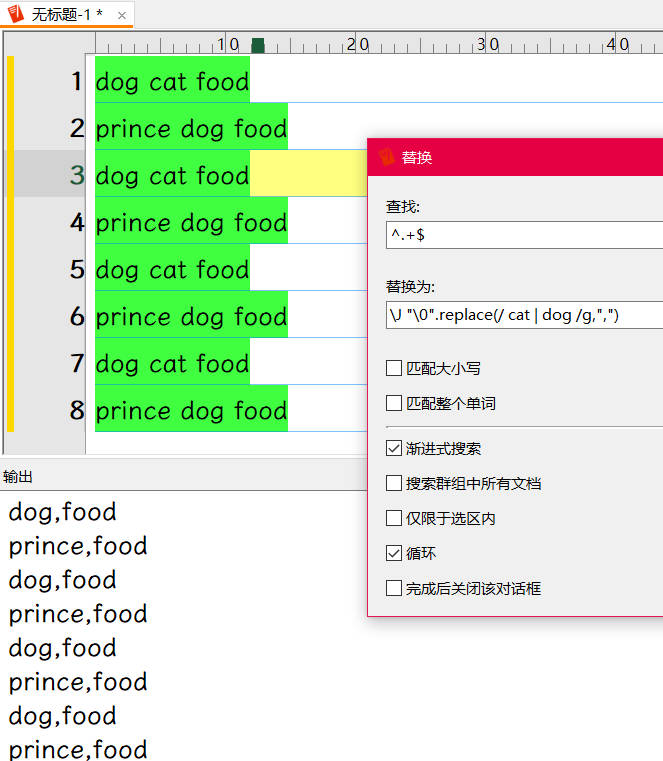
EmEditor has a powerful feature that other text editors do not have, but it is rarely mentioned, which is the \J mode (using JavaScript function or methods in replacement expressions), which can compensate for the shortcomings of regular expressions in certain situations. For example, this question can be handled using the following expression.

Find:^.+$

Replace: \J "\0".replace(/ cat | dog /g,",")

˽cat˽ and ˽dog˽ are the keywords to be replaced and you can change them according to your requirements. After clicking Replace All button , wanted strings will be left in same line.

screenshot from another link